


Tezza: Aesthetic Editor
3.7206.00 Reviews
App Specs
- Version
- 3.40.3
- Updated On
- License
- Free
- Downloads
- 5,000,000+
- Developer
- Tezza
- Categories
- Photography
- Platform
- Android, iOS
Screenshots
 Analysis by AppCompare
When I choose a phone photo editor, I start with a practical question: do I want to polish individual images, or give a whole set of photos and clips a recognizable mood? Tezza: Aesthetic Editor is aimed squarely at the second job. It’s a photography app from Tezza, and its appeal is less about chasing perfect technical corrections than finding a visual style I can reuse. That makes it worth considering if I often post pictures and videos together, but not necessarily if I only need a quick crop or a precise fix.
That distinction matters before you download it. A consistent look can make travel snapshots, outfit photos, or everyday moments feel more intentional, but a preset cannot rescue every lighting problem or make mismatched scenes identical. I get the best results when I treat the filters as a starting point and judge each image on its own. If you enjoy making small creative choices rather than tapping one button and moving on, Tezza has a clearer purpose than a basic editor.
Choose it for a look, not just a quick fix
The app is free to download, and its age rating is Everyone. It has a 3.6 average from around 13,000 ratings, with more than 5 million installs, so it has reached a substantial audience while still leaving room for mixed reactions. I wouldn’t read those numbers as a guarantee that it will suit your habits: an editor’s value depends heavily on whether its style fits the pictures you actually take.
Tezza is also a better match for people who make content in batches. If I’m preparing a group of photos from a weekend away, I can settle on a general tone and carry it across the set instead of editing each picture as if it belonged to a different account. The same idea applies to short video clips mixed into a photo feed. The useful question is whether you want that visual continuity often enough to make a dedicated editor part of your routine.
Where its editing approach stands out
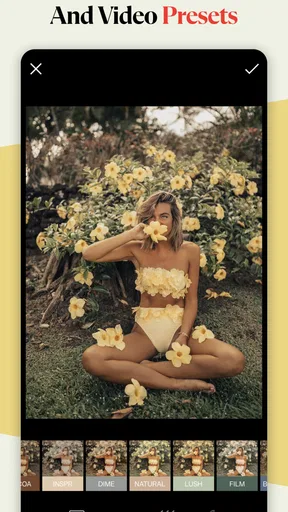
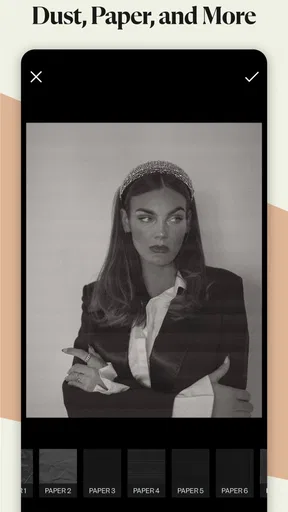
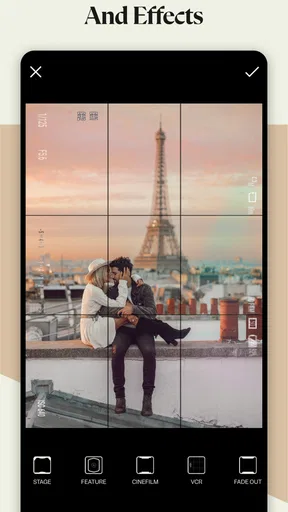
The filters are the main reason I’d open Tezza instead of a plain adjustment tool. They give photos a more deliberate, styled finish, and the app also brings that treatment to video. That combination is especially handy when a post includes still images and moving moments from the same day. Rather than editing the video in one place and the photos somewhere else, I can work toward a shared atmosphere inside one creative workflow.
My practical tip is to pick one image from a batch as a reference before editing the rest. Try the look on a photo with skin, one with shadow, and one with a bright area; a filter that flatters a sunny portrait may make a dim indoor shot feel too heavy. Keep the reference image nearby as you work, and make modest adjustments where needed. This is a more dependable route to a cohesive set than applying one treatment blindly to every frame.
Good habits for photos and video
When I’m editing a video, I think about the whole clip rather than judging a single frame. A filter that looks attractive on the opening shot may make a later scene too dark or intense. I’d preview the most different moments in the clip before settling on a look, particularly if the lighting changes as I move from indoors to outdoors. That small check can save a finished post from feeling uneven.
Worth Reading Before You Choose

Flipboard Shows What News Apps Must Do Beyond the Feed

Switching to Android Auto Means Rethinking Your Driving Routine

Google Calendar Makes a Crowded Week Easier to Manage

Ludo King Makes the Most of the Minutes Between Plans

Baby Panda World Brings Quick Play to Modern Phones, but Its Game Library Feels Busy

ESPN’s Live Game View Makes Following Close Games Easier
Text and overlays offer another way to shape a post, but they work best when they support the picture instead of competing with it. For a story, I’d keep the words short and give the image room to breathe; for a set of product or outfit photos, I’d reuse a restrained treatment so the pictures remain the focus. Saving an edit as a preset can also save time, though I’d treat it as a repeatable starting point, not a promise that every new photo will need no adjustment.
When another editor may suit you better
If your main need is accurate correction—bringing back detail in a difficult exposure, making careful color adjustments, or preparing a photo for a specific technical purpose—a more controls-first editor may be a better fit. Tezza’s style-led approach is appealing when I want a mood; it is less compelling when the job is simply to correct a problem with as little visual character added as possible. For quick everyday tasks like cropping or straightening, the editor already on your phone may also be enough.
It may also be the wrong choice if you dislike curated presets or want every image to retain a neutral, natural appearance. A strong shared style can become repetitive when it is applied to every subject, and the look that works for portraits may not suit food, architecture, or a dim concert clip. I’d use Tezza selectively rather than force all my photos into one aesthetic. That gives the app a useful role without making it the only tool in my camera routine.
Getting to Know Tezza
Let’s dive right into what makes Tezza: Aesthetic Editor so appealing. At first glance, you’re greeted with a sleek and intuitive interface that just feels right. It's like the app itself is giving off those artsy vibes. The layout is straightforward, making it super easy to navigate even if you’re not tech-savvy.
One thing that stood out to me was the incredible variety of filters available. These aren’t your run-of-the-mill filters; they’re crafted by Tezza and her team to give your photos a unique touch. Whether you’re aiming for a vintage feel or a modern flair, there’s something here for every mood.
Features That Wow
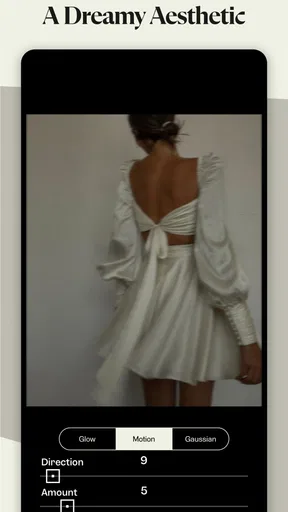
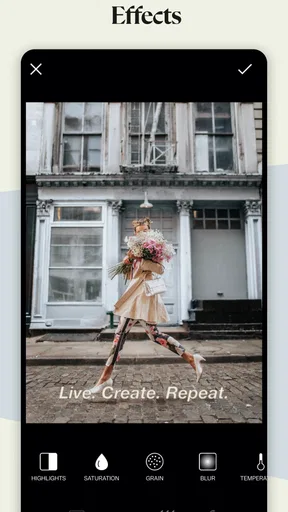
Alright, let's talk features. The app is packed with tools that allow you to tweak every aspect of your image. From adjusting brightness and contrast to playing around with saturation and warmth, you’ve got the power to transform your photos entirely.
But what really sets Tezza apart is its video editing capabilities. You can apply those same gorgeous filters to your videos, which is a total game-changer for content creators. Imagine having a cohesive aesthetic across both your photos and videos. It’s a breeze with this app.
Another cool feature is the ability to add text and overlays. Whether you’re crafting a story or just adding a little flair to your pics, the options are endless. The fonts and styles are trendy and fun, perfect for making your content pop.
The Creative Community
What I love about Tezza: Aesthetic Editor is the sense of community it fosters. The app often highlights user creations, giving you a little boost of inspiration whenever you need it. Plus, seeing how others use the app can spark new ideas for your projects.
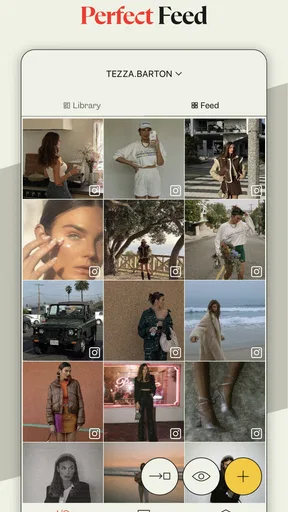
There’s a built-in feature that allows you to save your favorite edits as presets. This means you can easily apply the same look to multiple photos, ensuring your feed stays consistent and stylish. It’s like having your personal photo editing assistant.
Here’s a simple way I’d use that preset feature for a real day out. I’d first edit a representative shot—a face in shade, a street scene, or whatever best captures the light of the day—then save the look only after checking that the warmth and contrast still feel right. I’d apply it to the rest of the set, but review each frame individually. A white wall, a sunset, and a portrait react differently to the same treatment, so small corrections are more useful than chasing identical sliders.
This workflow is particularly helpful when a post mixes stills with video. I’d decide on the overall mood before adding text, then use overlays only on the frames where they clarify the moment. If every image carries lettering or decoration, the set can feel busy; leaving some frames clean gives the edited ones more impact. Tezza’s tools make it tempting to keep adding touches, but restraint is often what makes a consistent style look considered rather than copied.
Everyday friction and the cost of switching
Tezza’s current version is 3.22.5, and it supports devices running Android 7.0 or later. That gives Android users a practical compatibility check before they build a routine around it. The app is also available on iOS. I’d still try it on a small group of ordinary photos first, because a workflow that feels easy for one person may be slower than their existing camera-roll editor.
The free download lowers the barrier to trying it, while in-app purchases range from $3.99 to $39.99 per item. I’d explore the free experience with the kind of pictures I actually take before paying for anything. The useful test is not whether extra options sound appealing, but whether I repeatedly hit a limit that interrupts a real editing task. If I only edit occasionally, the free version may be enough; if the app becomes part of regular photo-and-video batches, a paid item may make more sense if it addresses a specific need.
Switching editors has a small but real learning cost. I’d need to get used to where the controls sit, decide which looks suit my own camera roll, and establish a reliable sequence for photos and clips. Presets can reduce repeated work once that sequence is clear, but they do not eliminate the need to check each image. If I already have a fast, familiar method for making neutral corrections, moving everything to a style-focused editor may add steps rather than save them.
Ease of Use and Accessibility
Now, I know what you’re thinking. With all these features, is the app overwhelming? Not at all. The beauty of Tezza lies in its simplicity. Each tool is easy to find, and there are helpful guides if you ever get stuck. Plus, the app’s performance is smooth, with no noticeable lag, even when editing videos.
The app is available for both Android and iOS, making it accessible to a wide range of users. It’s free to download, but there’s also a subscription option that unlocks even more features. Trust me, it’s worth every penny if you’re serious about stepping up your editing game.
For a casual user, “serious” does not have to mean posting every day. It can simply mean caring about the way a collection of memories hangs together. I’d recommend Tezza to someone who enjoys shaping a warm, vintage-leaning or otherwise distinct mood and wants a similar sensibility across photos and videos. It is less suited to someone who wants a purely technical tool, dislikes filters, or edits only once in a while and prefers not to learn another interface.
Final Thoughts
So, is Tezza: Aesthetic Editor worth a try? Absolutely! Whether you’re a seasoned photographer or just someone who loves capturing memories, this app elevates your content effortlessly. With its user-friendly interface, stunning filters, and powerful editing tools, it’s no wonder it’s a favorite among creatives.
Ready to transform your photos into works of art? Give Tezza: Aesthetic Editor a shot, and watch your feed come to life with color, style, and personality. You can find the download links for both Android and iOS on our website. Happy editing!
My recommendation is to start with a small, mixed set rather than judging the app by one portrait. Try a photo, a short clip, and a scene with different lighting, then see whether the same visual direction still feels like you. If it does, the preset workflow and shared treatment for stills and video can earn a place in your routine. If you find yourself undoing the look or reaching for basic corrections elsewhere, that is a useful sign that a simpler or more technical alternative fits better.
Pros
- User-friendly interface boosts creativity.
- Wide range of filters for unique aesthetics.
- Regular updates with new features.
- Integrated video editing capabilities.
- Premium features enhance editing options.
Cons
- Limited features in the free version.
- Occasional in-app ads can disrupt flow.
- Requires internet for some functionalities.
- Some filters are locked behind paywall.
- Exporting can be slow on older devices.
FAQs for Tezza: Aesthetic Editor
What features does Tezza: Aesthetic Editor offer?
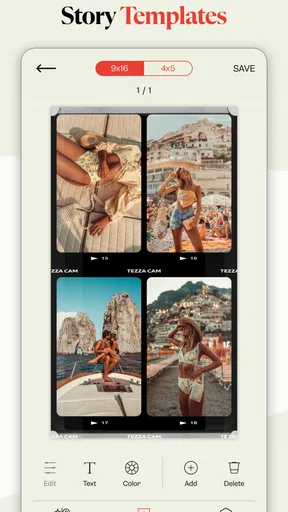
Tezza: Aesthetic Editor provides a wide array of features designed for both photo and video editing. Users can access a variety of filters, presets, and editing tools to enhance their media. Additionally, the app includes features like text overlays and templates, making it easy to create visually appealing content for social media.
Is Tezza: Aesthetic Editor free to use?
Tezza offers both free and premium versions. The free version includes basic editing tools and a limited selection of presets. For access to the full range of features, including premium filters and advanced tools, users can opt for a subscription. This subscription model supports the continuous development of new features and updates.
Can I use Tezza: Aesthetic Editor on both Android and iOS devices?
Yes, Tezza: Aesthetic Editor is available for both Android and iOS platforms. Users can download the app from the Google Play Store or Apple App Store respectively. Cross-platform availability ensures that users can enjoy a seamless editing experience regardless of their device preference.
Does Tezza: Aesthetic Editor require an internet connection to work?
Tezza can be used offline for basic editing tasks, such as applying filters and making adjustments. However, an internet connection is required for downloading new presets, accessing cloud-based features, and receiving updates. To fully utilize all of Tezza's capabilities, occasional internet access is recommended.
How user-friendly is Tezza: Aesthetic Editor for beginners?
Tezza is designed with an intuitive interface, making it accessible for beginners. The app provides easy navigation and straightforward tools, allowing new users to quickly grasp the editing process. For those new to photo and video editing, Tezza also offers tutorials and tips to help users get started and make the most of its features.


